Multi-Monitor Render
How to play BeamNG.drive on multiple monitors: requirements and how to enable Multi-Monitor Render.Multi-Monitor support is very experimental and may not work properly on certain setups.
Requirements
Multi-Monitor (Triple Monitor) support requires the following criteria to be met to work correctly:
- You must be using 3 monitors of the same model or type
- Game must be set to Borderless mode in
Options -> Display - Keep Nvidia Surround/AMD Eyefinity disabled
Enabling Multi-Monitor Render
To enable this feature, simply navigate to Options -> Display and tick the Multi-Monitor Render setting.
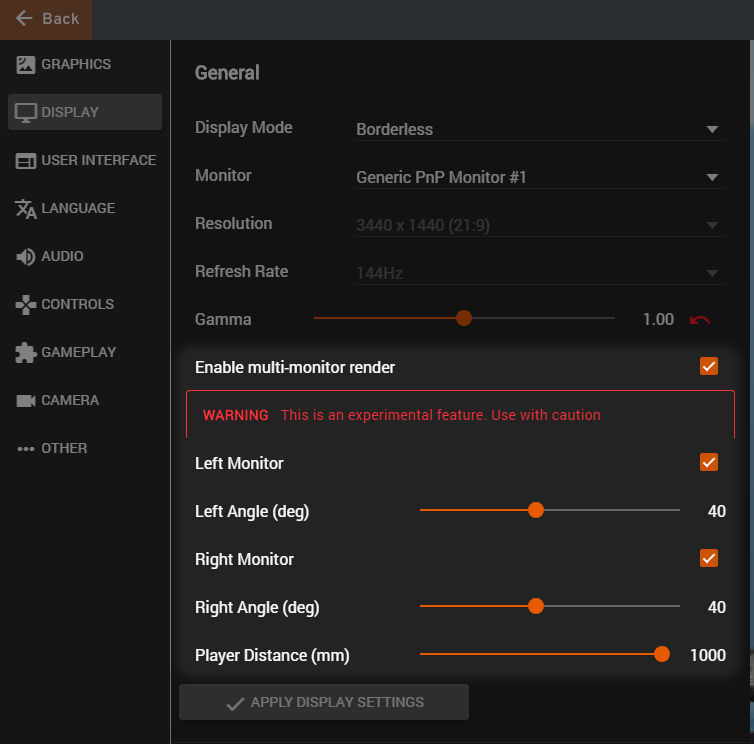
You can fine tune the angle of the side views using the dedicated sliders in this menu.
Once done, press the Apply Display Settings button to confirm and save.
Video Sample
Last modified:
January 4, 2022
Was this article helpful?
More in “PC features”
All articles →